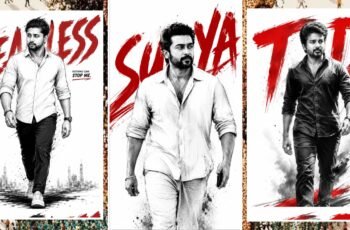
Creating an image vector art illustration is like building with clean digital LEGO blocks. You start with simple shapes, shape them with precision, and end with artwork that stays sharp at any size.
What Vector Art Means
Vector art uses points, lines, and curves instead of tiny pixels. That means your design can grow from a small icon to a giant poster without getting blurry. This is why designers love it for logos, posters, app graphics, and brand assets. If you want a clear, polished look, vector art gives you that smooth finish. It feels like drawing with a ruler and a paintbrush at the same time. You get control, flexibility, and a professional result.
Why Choose Vector Art
Vector illustration is perfect when you need clean edges and easy edits. You can change colors, resize objects, and move shapes around without ruining the image. That makes it a smart choice for modern design work. It also saves time during revisions. If a client wants a new color or a smaller icon, you can adjust it fast. Think of it like editing a puzzle instead of repainting a wall.
Create An Image Vector Art Illustration: Start Simple
The best way to create an image vector art illustration is to begin with a simple concept. Pick something easy like a fruit, a cup, a house, or a character head. Simple ideas help you focus on structure instead of getting lost in details. Next, sketch the basic shape or place rough shapes on the canvas. Build the illustration from circles, rectangles, and curves. This method keeps the design neat and makes the final artwork look balanced.
Use Basic Shapes First
Basic shapes are the backbone of vector design. A circle can become a face, a rectangle can become a phone, and a triangle can become a mountain. When you combine them well, the artwork starts to feel alive. You do not need to draw everything from scratch. You just need to assemble the right parts. That is the real magic of vector art.
Tools You Need
You only need a vector design app and a few core tools. The pen tool helps you draw custom paths, while shape tools let you build the foundation quickly. Anchor points and curve handles help you fine-tune every edge. Layers also matter a lot. They keep your elements organized so you can work without confusion. When your artwork grows, good layer control feels like having labeled drawers in a tidy desk.
Pen Tool And Shapes
The pen tool is powerful because it gives you precision. You can create smooth curves, sharp corners, and custom outlines with it. It takes practice, but once you learn it, your designs improve quickly. Shape tools are faster for blocking out the main structure. Use them first, then refine with the pen tool. That balance gives you speed and accuracy.
Build The Illustration
Now start combining shapes into a complete design. Add the main object first, then add smaller parts like eyes, buttons, shadows, or highlights. This order keeps your design clean and easy to manage. Try to keep every element simple at the start. You can always add more detail later. In vector art, less often looks better, especially when you want a modern and stylish result.
Add Depth With Color
Color gives vector art its personality. Flat colors create a clean look, while gradients add a little depth and energy. Use contrast wisely so the main object stands out from the background. Shadows and highlights also help the image feel more real. A small shadow under an object can make it pop instantly. It is like putting a spotlight on the hero of your design.
Polish Your Artwork
Once the main shapes are ready, clean the edges and adjust proportions. Zoom in and check whether the curves look smooth and the spacing feels right. Small changes can make a big difference. Remove extra points if the path feels messy. Too many anchor points can make the artwork harder to edit later. A clean vector file is like a neat room: easier to use and nicer to look at.
Export In The Right Format
After finishing, export your design in a vector-friendly format like SVG or AI. These formats keep the artwork editable and scalable. If you need a version for web use, SVG is especially useful. For sharing or previews, you can also export PNG or JPG. But keep the original vector file safe. That original file is your master copy, the one you will thank yourself for later.
Best Practices
Always start with a rough idea before touching the software. Good planning saves time and prevents messy edits. It also helps you stay focused on the final goal. Use references when you need help with proportion or style. Study simple icons, mascots, or poster graphics to understand how artists build shapes. Practice regularly, and your speed and confidence will grow fast.
Common Mistakes To Avoid
Do not overload the design with too many details. Complex shapes can look cluttered and distract from the main subject. Keep the first version clean, then improve it step by step. Do not ignore spacing, alignment, or color balance. These small things decide whether the art feels amateur or polished. Strong vector art is not just about drawing well; it is about arranging everything with care.

Create An Image Vector Art Illustration Of A Stylish South Indian Man ,On A Solid Black Background. The Man Has A Modern Messy Hairstyle, Wearing Sunglasses, A Black Shirt, And A Stylish Chain. use A High-contrast Color Palette Of Deep Yellow Red, Skin Tones, And Bright White Highlights.add Long Text Of “SURYA” At Background. image Size Of 3:4.